 Plugins
Binary Ninja Plugin v1.0.0
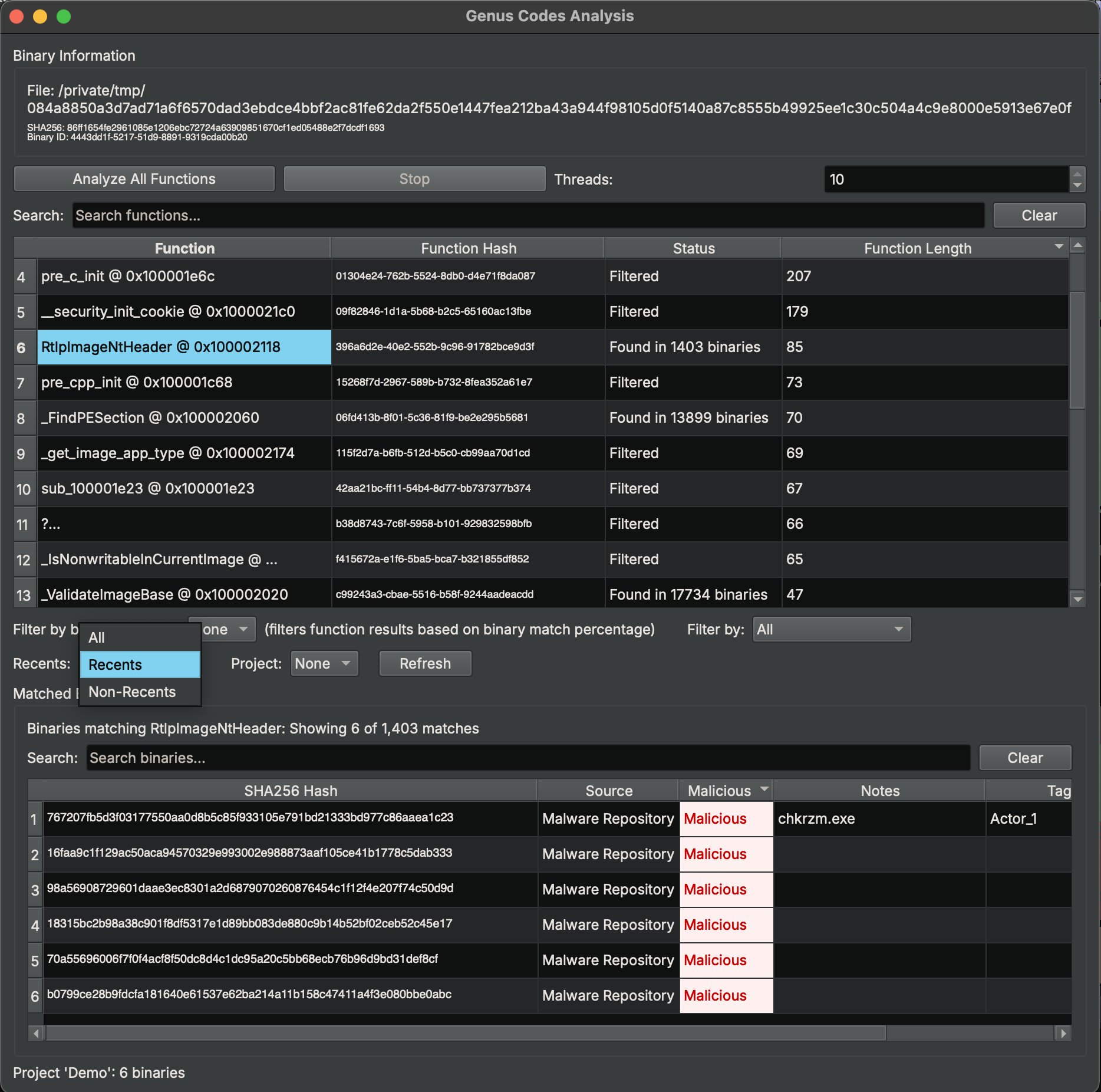
Analyze functions in Binary Ninja against the Genus Codes database. Identify known code, detect malware signatures, and discover binary relationships directly from the disassembler. Filter results by binary similarity, malicious/benign classification, recents history, and projects.
Login to DownloadSHA256 Checksum
b4e54b97819083710860ba973fdbbbfa38574943eb985c0b8fb22fe9c5fce18e
Installation
- Download the zip file above.
- Extract the zip into your Binary Ninja plugins directory:
macOS: ~/Library/Application Support/Binary Ninja/plugins/Linux: ~/.binaryninja/plugins/Windows: %APPDATA%\Binary Ninja\plugins\
- The
genus_codes/folder should be directly insideplugins/. - Restart Binary Ninja.
API Key Setup
- Go to your Account page on genuscodes.com.
- Under "API Tokens", enter a name (e.g. "Binary Ninja") and click Create Token.
- Copy the
gc_...token — it is only shown once. - In Binary Ninja: Settings (Ctrl+, / Cmd+,) → search for "Genus" → paste the token into the API Token field.
- The
API Server URLdefaults tohttps://genuscodes.com— no changes needed.
Usage
- Open any binary in Binary Ninja.
- Go to Tools → Genus Codes → Show Analysis Widget.
- Click Analyze All Functions to scan all functions against the database.
- Results show per-function: "Unique", "Found in X binaries", or "Error".
- Click a function row to view its matched binaries in the table below.
- Double-click any row to navigate to that function in the disassembly.
- Right-click a row for additional options (analyze single function, copy hash).
- Adjust Threads (1–10) to control concurrency.
Filtering
After analysis completes, use the filter controls to narrow results. All filters stack (AND logic).
- Binary Similarity: Filter functions by the percentage of shared code between the current binary and matched binaries (e.g. ≥80% similarity).
- Malicious/Benign: Filter by classification — Malicious Only, Benign Only, Contains Malicious, Contains Benign, or Unique Only (no matches).
- Recents: Show only functions whose matches appear in your recent lookups ("Recents"), or only those with matches not in your recents ("Non-Recents").
- Project: Select a project to show only functions whose matches belong to that project's binaries.
Click Refresh to re-fetch your recents and project list from the server. Both the function table and the matched binaries table update when filters change.